In the past few weeks, we’ve seen updates to all the major coding models in pretty quick succession. All of them made a significant jump from the previous versions, especially on software engineering benchmarks. One thing I’ve noticed from these improvements is that you no longer need to instruct them on how to work within a codebase or how to use different tools. They figure it out without using that many tokens. This means you can simplify your AGENTS.md1 and only include things that aren’t discoverable just by looking at the code.
Start with the north star
My process is I write my AGENTS.md first. Before writing any commands or conventions, I start by writing a few sentences about what the project is, who it’s for, and what problem it solves—basically defining a north star. The agent will implicitly refer to this every time it rereads the file.
I do this because telling the agent how to do things isn’t enough. When it understands why (what the final goal is) it makes better decisions during planning and implementation.
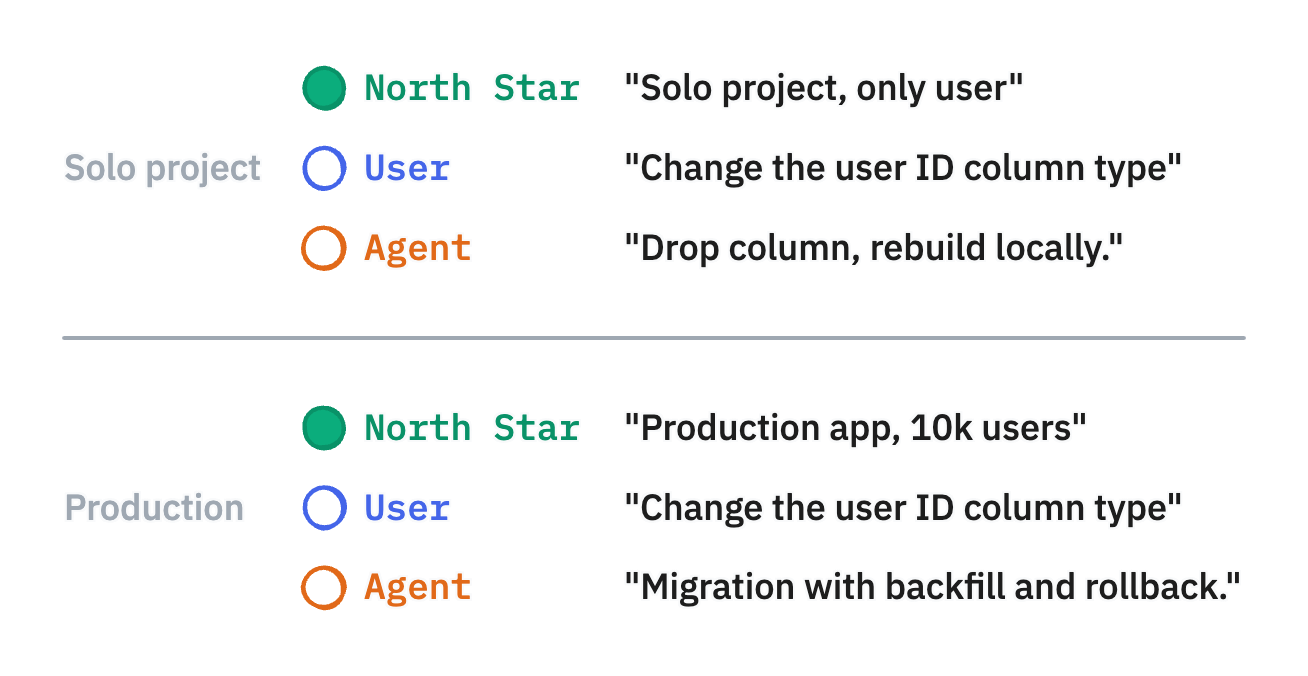
For example: if your north star says this is a solo project where you’re the only user, the agent might suggest dropping a column and rebuilding your local database. Simple, fast, gets you moving. But if you’re working on a legacy codebase that’s in production, it’ll write a proper migration with backfill logic and a rollback strategy.
Same thing with scope decisions. Should you add this new dependency? On a solo project, sure. On a production app with 10k users, the agent will consider bundle size and long-term maintenance. Should you refactor this module while you’re in there? On a new project, probably yes. On a legacy system that’s working, maybe leave it alone unless it’s blocking you.
# Grain Log - iOS App

Film photography app to track camera settings and film rolls.
Then the essentials
Then I keep some of the essentials so it’s easier for the agent to do research online if it needs to, especially regarding versions of libraries. If they’re out of the ordinary or newer than the model’s cutoff date. In my case, in addition to the stack and commands, this is where I mention that I use Nix shells for development. Without that, the agent would waste time and tokens trying to figure out or even trying to install dependencies that are already there.
Here’s what a minimal AGENTS.md looks like:
# Grain Log - iOS App

Film photography app to track camera settings and film rolls.

## Stack

- Swift, SwiftUI
- GRDB (chose this over SwiftData for query control)

## Development

Open `GrainLog.xcodeproj` in Xcode.

## Conventions

- Models: `Roll`, `RollFrame` (not RollRecord, Frame, or Exposure)
- Data: local-first, only inventory synced from API
Finally, I might have some more detailed documentation or tasks/SOPs (standard operating procedures) that an agent should do in a particular order but that aren’t easily automatable. For example, reminding the agent: when you use Drizzle, first update the schema, then generate the migrations. Not the other way around, which some agents like to do. Or for end-to-end tests: update snapshots only after you’ve reviewed the visual changes, not automatically on failure.
That’s pretty much it. That’s the outline most of my AGENTS.md files have followed for the past couple of months, especially since the latest models came out.
What to cut
So if you already have an AGENTS.md, what should you cut? Pretty much everything that’s automatable: style guidelines, import orders, naming conventions, best practices that are easy to forget.
As a reminder, AGENTS.md should contain context rather than enforce rules. If you want to enforce something, add linting, pre-commits, and CI checks so that it’s an effective guardrail. The agent gets blocked from committing or moving on to the next step if it hasn’t formatted, linted, or rerun the tests.
Hierarchical AGENTS.md
Another thing to leverage that I haven’t seen much in projects or with teams I consult with is hierarchical AGENTS.md. Most tools read AGENTS.md starting from the file they’re working on, up to the project root or even your file system root. It’s a powerful tool, but if you don’t pay attention, you can end up bloating your context.
Here’s how I use that for the Grain Log monorepo:
/
├── AGENTS.md                          # Project-wide context
└── apps/
    ├── grain-log-mobile/
    │   └── AGENTS.md                  # iOS app
    └── inventory-api/
        └── AGENTS.md                  # API
Root /AGENTS.md:
# Grain Log

Film photography app to track camera settings and film rolls.

## Applications

- `apps/grain-log-mobile/` - iOS app (Swift/SwiftUI)
- `apps/inventory-api/` - Camera/film inventory API (Cloudflare Workers)

## Development

Uses devenv.nix:
```bash
devenv shell/apps/inventory-api/AGENTS.md:
# Grain Log - Inventory API

Camera and film stock inventory for the mobile app.

## Stack

- Hono on Cloudflare Workers
- Drizzle ORM + PostgreSQL

## Commands

- `pnpm dev` - Dev server (port 3200)
- `pnpm db:generate` - Generate migrations
- `pnpm db:migrate` - Run migrations

## Conventions

- Drizzle: update schema first, then generate migrations
The root file has the north star and points to the different apps. Each app’s file reinforces the north star from its perspective and adds specific details. Keep each one minimal. The agent sees both files, and context adds up fast.
The cost of bloat
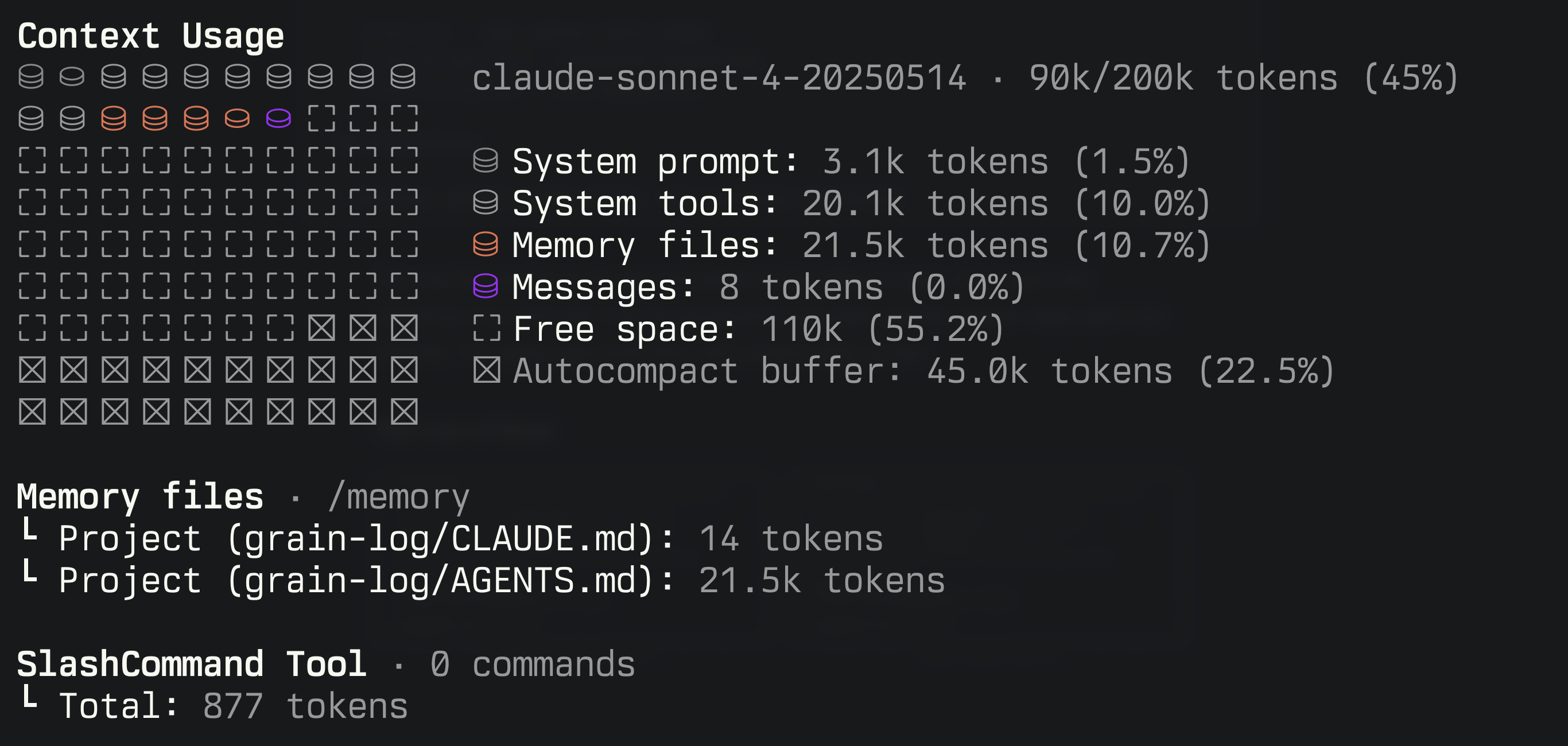
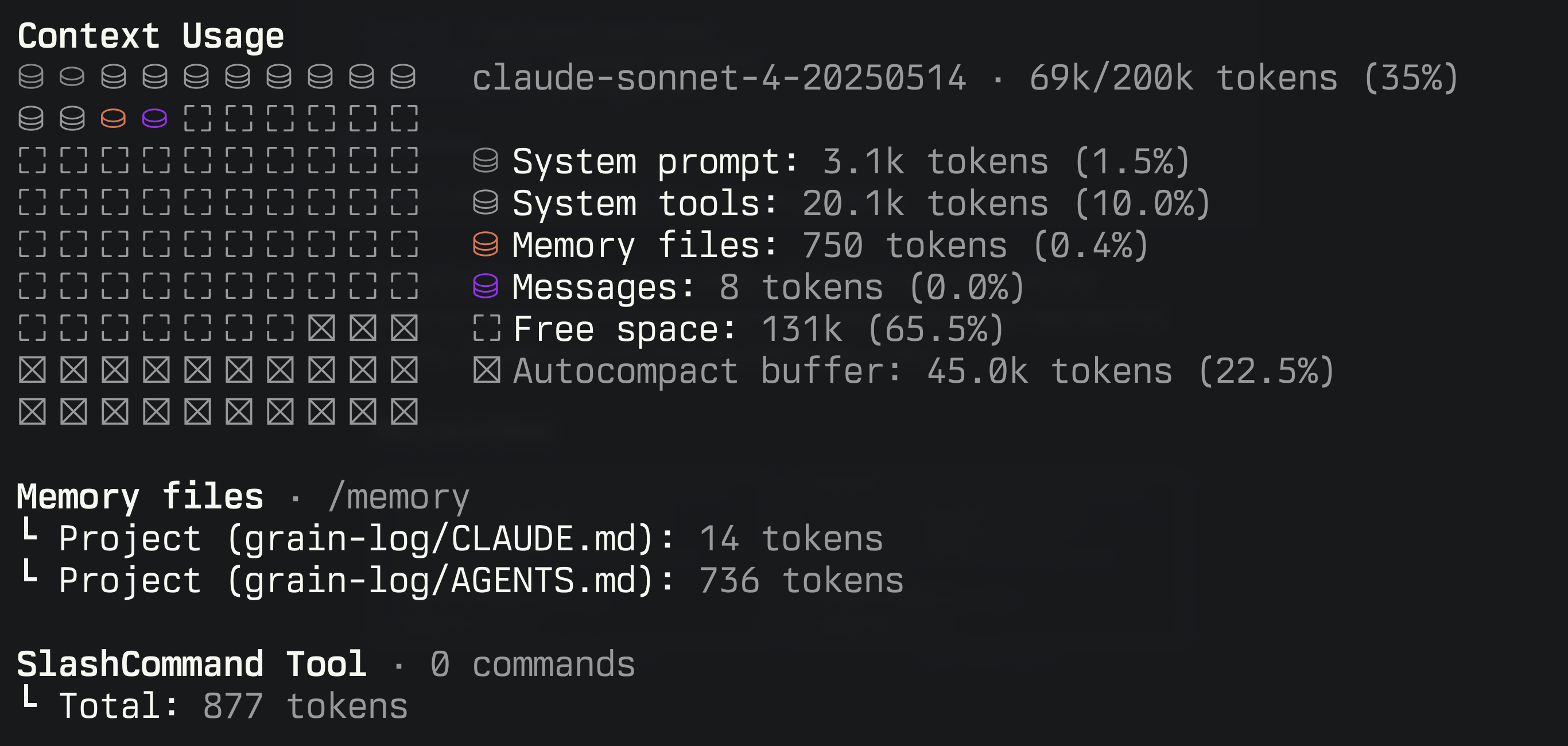
The difference is obvious: 21.5k tokens vs 750 tokens. That’s 10% of your context window gone before you’ve even started. Since every message gets sent back and forth with the full context, this compounds throughout your session. This also means you’re sending more tokens, which is directly impacting the cost of the conversation.
What comes next
A lean AGENTS.md covers the basics. But what about domain-specific knowledge that only matters sometimes? That’s where Skills come in.
Footnotes
-
Everything here applies to
CLAUDE.mdand similar instruction files for coding agents. See agents.md for more.